On August 21, 2026, Google began widely alerting Merchant Center accounts: starting January 31, 2027, any product image smaller than 500×500 pixels will be automatically disapproved and stop serving on Google Shopping — with no grace period.
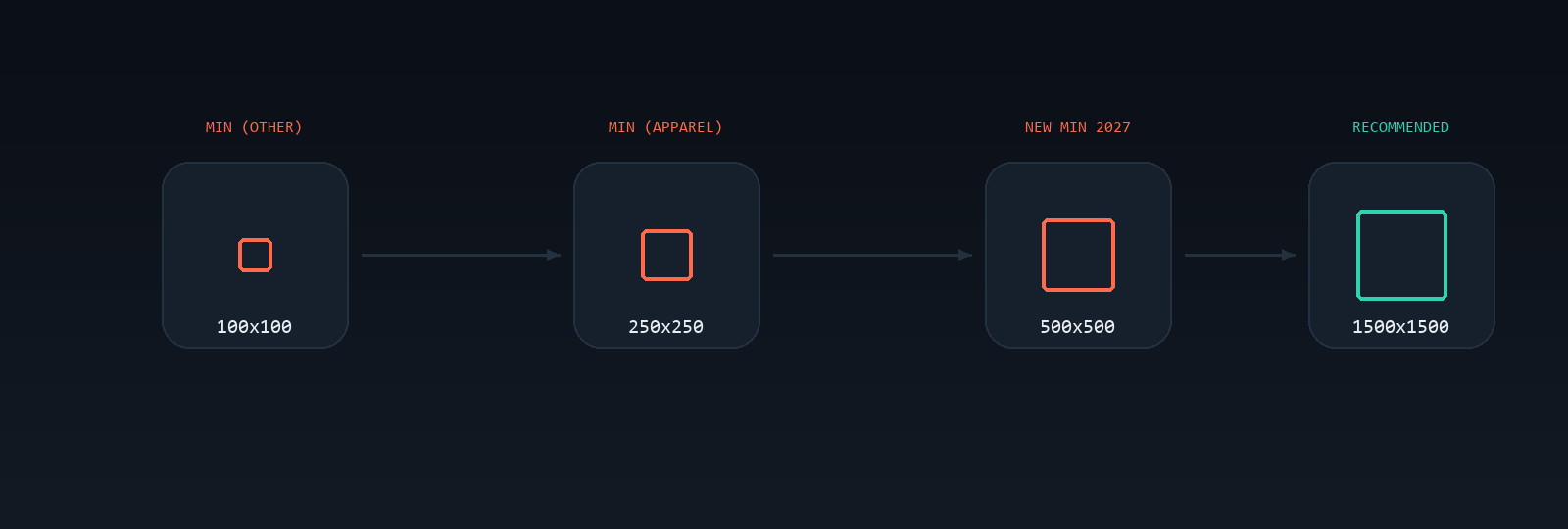
Current requirements vs. the new rule
- Right now (through January 30, 2027): the minimum is 100×100 px for most products, and 250×250 px for apparel
- Starting January 31, 2027: the minimum for every product, no exceptions, becomes 500×500 px — anything smaller means immediate disapproval and stopped serving
- Recommended size for best performance across every placement: 1500×1500 px or larger
- Upper limits: no image larger than 64 megapixels, and no file larger than 16MB
Why is the recommended size so much bigger than the minimum?
The minimum (500×500) only guarantees the image won’t be rejected. But Google displays the same image across different placements and sizes — search results, Shopping ads, mobile previews, the zoomed-in view when a shopper taps a product — and the higher the original resolution, the less chance it shows up blurry or badly cropped in any of those.
How do you make sure your products are safe before the deadline?
- Check the Diagnostics report in Merchant Center to find any products currently using images under 500×500 px
- Confirm the feed’s image_link actually points to a high-resolution version — not a downscaled copy your CDN auto-serves to speed up the site
- Check both the file size (under 16MB) and total pixel count (under 64 megapixels) for every image
- Test a sample of products now, rather than waiting until close to January 31, 2027
- If you use a photography system or external supplier for images, confirm the required size with them now, so new images already match from the start
The last thing you want is your best-selling products disappearing from Google Shopping overnight in January because of a photo taken years ago at a small size.
What should you do now?
- Open the Diagnostics report in Merchant Center and see how many products are at risk
- Prioritize your best-selling products first
- Re-upload or reshoot any image below the recommended size (1500×1500)
- Document the new standard size in your internal product photography guidelines
Need to make sure every product image is safe before January 2027?
We audit your entire Google Merchant Center feed, flag every image at risk of disapproval, and hand you a clear plan to fix them before the deadline.