If your Google Ads results have felt a little broken over the last couple of months — ROAS steadily dropping even though you didn’t touch anything, a good week followed by two bad ones, CPCs creeping up while PMax seems to be taking over every decision — you’re not alone, and your account isn’t broken. This is the real, measurable effect of a change Google made to how Smart Bidding works.
What actually happened on August 17, 2026?
Google changed how Smart Bidding behaves for budget-limited campaigns running Target ROAS or Target CPA. In simple terms: the stated target now matters far more than it used to, and Google pushes performance toward it directly instead of letting campaigns over-deliver well beyond it. This closed a workaround many advertisers were using — a small budget plus a high target ROAS, producing a small but highly profitable campaign running well above its stated target. That setup doesn’t work the same way anymore.
The data behind it
These figures come from an analysis published by Define Digital Academy, which reviewed over 502 campaigns across 78 ad accounts, totaling $7.2 million in spend over 90 days and more than 122,000 conversion actions — split across three windows: the 30 days before the update, the first 4 weeks after it, and weeks 5 through 8 after it.
- Actual performance vs. the stated target: before the update, campaigns averaged 159% of their stated ROAS target (a 300% target effectively performed around 477%). In the first 4 weeks after, that dropped to 98% of target (around 294% for the same example). After another 4 weeks, it settled at 89% of target (around 267%) — exactly what Google said would happen.
- Volatility tracks campaign-level conversion volume: campaigns getting fewer than 10 conversions a week saw 80% of them swing by more than 20%, and 35% had entire weeks with zero conversions. Between 30 and 50 conversions a week, volatility dropped to 53%, with no campaigns reporting a zero-conversion week. Above 50 conversions a week, volatility was down to 44%, again with no zero-conversion weeks.
- Cost-per-click (CPC): no broad average increase — the exception was campaigns that were already beating their stated target, which saw CPC rise up to 15%, because Google started bidding into pricier, more likely-to-convert auctions instead of playing it safe.
- Switching to Maximize Conversion Value isn’t a magic fix: it needs roughly $1,000+ in weekly spend and at least 10 conversions a week to reliably hold a ROAS target. Campaigns spending under $250/week held their target only 42% of the time, rising to 88% for campaigns spending above $2,500/week.
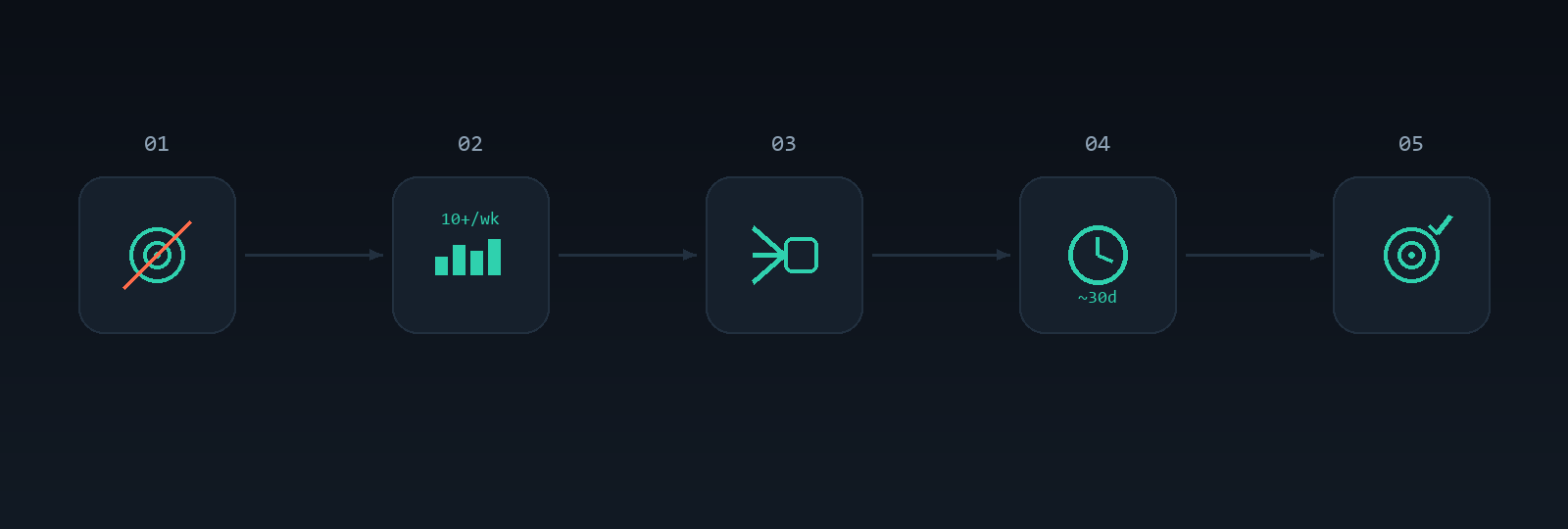
The five steps experts recommend
- If your campaign is still beating its stated target (above Target ROAS or under Target CPA), remove the target entirely and switch back to Maximize Conversion Value or Maximize Conversions. Let it rebuild its conversion base, and don’t reintroduce a target until you’re seeing at least 10 conversions a week (ideally more) with 4-6 weeks of real stability — not still improving week over week.
- Check conversion volume at the campaign level, not the account level. Aim for at least 10 conversions a week as a baseline; Google’s own documentation recommends at least 50 conversions a month before using Target ROAS or Target CPA.
- Consolidate your account structure instead of fragmenting it. If your account only generates around 80 conversions a month, don’t run more than 2-4 campaigns; merge thin campaigns into one with multiple ad groups or asset groups instead of splitting the data too thin.
- Don’t change strategy after one or two weeks. Google’s bidding runs in roughly 30-day cycles, so give any change enough time before judging it — performance often looks worse in the first couple of weeks and then recovers.
- Earn the target before you set it. Delay adding a Target ROAS or Target CPA for as long as possible, until you’re happy with performance and seeing real stability, not still-improving numbers. Setting it too early caps how much further the campaign could have improved.
This update isn’t something you fix with a quick reaction — it’s a normal part of Google Ads’ algorithm evolving. What separates accounts that recover is understanding the data and acting with patience, instead of changing settings every week.
Need your account reviewed against this update?
We review your entire Google Ads account: we identify which campaigns need their target removed, which are ready to add one, and build you a clear stabilization plan instead of guesswork every week.